zhangdd谈ceph(二)centos7.4 安装ceph10.2. Jewel环境规划及基础配置
centos7.4 安装ceph10.2. Jewel环境规划及基础配置
- 安装配置环境介绍
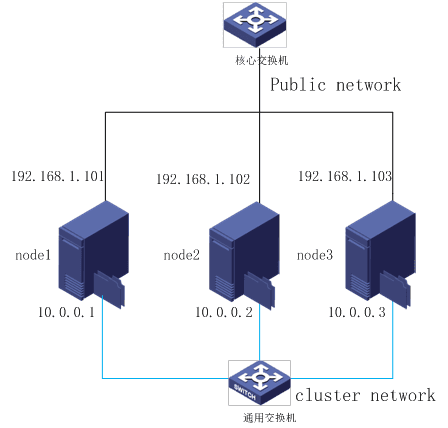
- 系统版本:
more /etc/redhat-release
CentOS Linux release 7.4.1708 (Core)
- 内核版本:
uname –a
Linux node1 3.10.0-693.21.1.el7.x86_64 #1 SMP Wed Mar 7 19:03:37 UTC 2018 x86_64 x86_64 x86_64 GNU/Linuxx86_64 x86_64 GNU/Linux
- ceph 版本:
ceph -v ceph version 10.2.10 (b1e0532418e4631af01acdd426f1905f4af)
ceph-deploy版本: [root@node1 cephfs]# ceph-deploy —version 1.5.37
- 服务器配置信息及运行服务统计
节点
配置
用途
网络配置
备注
node1
E5-2620 16G 600g*2 ssd 256g *4 4T*8
Mon1 mds1 osd 0-7
192.168.1.101 10.0.0.1
node2
E5-2620 16G 600g*2 ssd 256g *4 4T*8
Mon2 mds2 osd 8-15
192.168.1.102 10.0.0.2
node3
E5-2620 16G 600g*2 ssd 256g *4 4T*8
Mon3 mds3 osd 16-23
192.168.1.103 10.0.0.3
- 系统软件基础包初始化:
- 安装EPEL 软件源:
yum install -y https://dl.fedoraproject.org/pub/epel/epel-release-latest-7.noarch.rpm Add the Ceph repository to your yum configuration file at /etc/yum.repos.d/ceph.repo with the following command:
cat >/etc/yum.repos.d/ceph.repo
[ceph-noarch]
name=Ceph noarch packages
baseurl=https://download.ceph.com/rpm/el7/noarch
enabled=1
gpgcheck=1
type=rpm-md
gpgkey=https://download.ceph.com/keys/release.asc
yum -y update
yum -y upgrade
- 常用软件包、常用工具等(非必须、推荐安装)
yum -y install gcc gcc-c++ autoconf libjpeg libjpeg-devel libpng libpng-devel freetype freetype-devel libxml2 libxml2-devel zlib zlib-devel glibc glibc-devel glib2 glib2-devel bzip2 bzip2-devel zip unzip ncurses ncurses-devel curl curl-devele2fsprogs e2fsprogs-devel krb5-devel libidn libidn-devel openssl openssh openssl-devel nss_ldap openldap openldap-devel openldapclients openldap-servers libxslt-devellibevent-devel ntp libtool-ltdl bison libtool vim-enhanced python wget lsof iptraf strace lrzsz kernel-devel kernel-headers pam-devel Tcl/Tk cmake ncurses-devel bisonsetuptool popt-devel net-snmp screen perldevel pcre-devel net-snmp screen tcpdump rsync sysstat man iptables sudo idconfig git system-config-network-tui bind-utils update arpscan tmux elinks numactl iftop bwm-ng net-tools
- 3 集群主机系统初始化准备
所有Ceph 集群节点采用CentOS 7.3 版本,所有文件系统采用Ceph官方推荐的xfs,所有节点的操作系统都装在RAID1 上,ssd硬盘做raid1两组,其他的硬盘单独用,不做任何RAID。 安装完CentOS 后我们需要在每个节点上(包括ceph-deploy )做以下配置:
- 规范系统主机名;
centos 使用以下命令: hostnamectl set-hostname 主机名
- 添加hosts文件实现集群主机名与主机名之间相互能够解析
[root@ceph-node1 ~]# vim /etc/hosts
node1 192.168.1.101
node2 192.168.1.102
node3 192.168.1.103
- 每台ssh-copy-id 完成这些服务器之间免ssh密码登录;
[root@node1 ~]# ssh-keygen
Generating public/private rsa key pair.
Enter file in which to save the key (/root/.ssh/id_rsa):
Created directory ‘/root/.ssh’.
Enter passphrase (empty for no passphrase):
Enter same passphrase again:
Your identification has been saved in /root/.ssh/id_rsa.
Your public key has been saved in /root/.ssh/id_rsa.pub.
The key fingerprint is:
SHA256:w62DTPnM/FipBL7sadsaEguNRf88+n7AVJeeQ/wIwMw1y8f0 root@node1
The key’s randomart image is:
ssh-copy-id node1
ssh-copy-id node2
ssh-copy-id node3
- 关闭防火墙及开机启动
systemctl stop firewalld.service
systemctl disable firewalld.service
- 配置ntp 服务,保证集群服务器时间统一;
node1安装ntp 同步时间
yum -y install ntp ntpdate ntp-doc
systemctl enable ntpd.service
systemctl start ntpd.service
node2 node3 添加crontab ,执行自动时间同步; * */8 * * * ntpdate 192.168.1.101 >/dev/null 2>&1